Documentation Index
Fetch the complete documentation index at: https://docs.definite.app/llms.txt
Use this file to discover all available pages before exploring further.
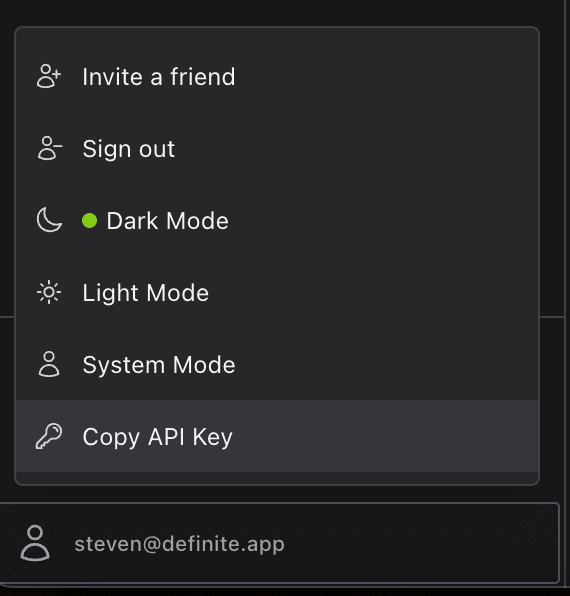
Your API key can be found and copied in the bottom left user menu:
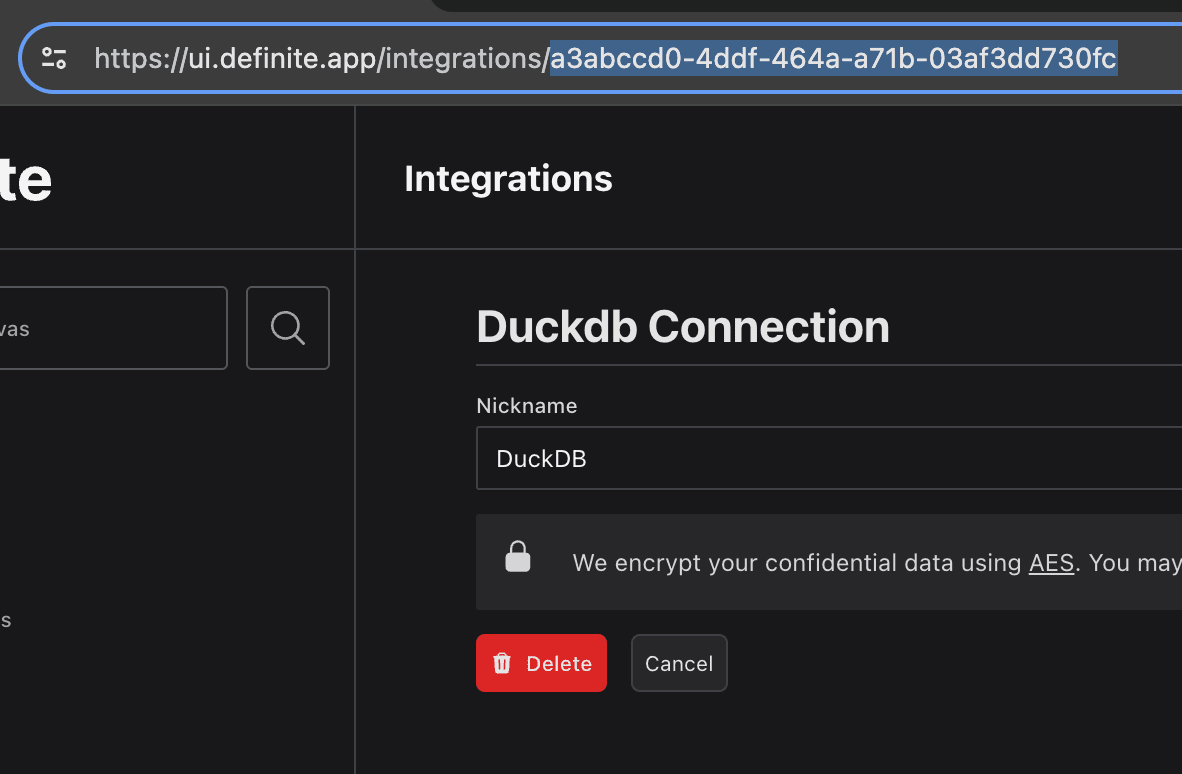
To query SQL databases or Cube integrations you will also need your integration id. Your
integration_id can be found on your integration’s page URL:
Query Database Integrations With SQL
You can query your databases with SQL through the API.
Python
import requests

API_KEY = "YOUR_API_KEY"
db_integration_id = "YOUR_DB_INTEGRATION_ID"
query = "SELECT * FROM TABLE LIMIT 10"

def run_query(sql: str, integration_id: str):
    json={
        "sql": sql,
    }
    if integration_id:
            json['integration_id'] = integration_id
    res = requests.post(
        url="https://api.definite.app/v1/query",
        json=json,
        headers={
            "Authorization": f"Bearer {API_KEY}",
            },
    )
    return res.json()
query_result = run_cube_query(query, db_integration_id)
cURL
curl -X POST "https://api.definite.app/v1/query" \
     -H "Authorization: Bearer YOUR_API_KEY" \
     -H "Content-Type: application/json" \
     -d '{"sql": "YOUR_SQL_QUERY", "integration_id": "YOUR_INTEGRATION_ID"}'
Query Cube Integrations
You can also query Cube through the API by passing in a Cube query in JSON format.
Python
import requests

API_KEY = 'YOUR_API_KEY'
cube_integration_id = 'YOUR_CUBE_INTEGRATION_ID'

query = {
  "dimensions": [],
  "filters": [],
  "measures": [
    "hubspot_deals.win_rate"
  ],
  "timeDimensions": [
    {
      "dimension": "hubspot_deals.close_date",
      "granularity": "month"
    }
  ],
  "order": [],
  "limit": 2000
}


def run_cube_query(query: dict, integration_id: str):
    json={
        "cube_query": query,
    }
    if integration_id:
            json['integration_id'] = integration_id
    res = requests.post(
        url="https://api.definite.app/v1/query",
        json=json,
        headers={
            "Authorization": f"Bearer {API_KEY}",
            },
    )
    return res.json()

res = run_cube_query(query, cube_integration_id)
cURL
curl -X POST https://api.definite.app/v1/query \
  -H "Authorization: Bearer YOUR_API_KEY" \
  -H "Content-Type: application/json" \
  -d '{
    "cube_query": {
      "dimensions": [],
      "filters": [],
      "measures": [
        "hubspot_deals.win_rate"
      ],
      "timeDimensions": [
        {
          "dimension": "hubspot_deals.close_date",
          "granularity": "month"
        }
      ],
      "order": [],
      "limit": 2000
    },
    "integration_id": "YOUR_CUBE_INTEGRATION_ID"
  }'
List Integrations
Get all integrations for your team.
Python
import requests

API_KEY = "YOUR_API_KEY"

def list_integrations(type_filter=None):
    params = {}
    if type_filter:
        params["type"] = type_filter
    res = requests.get(
        url="https://api.definite.app/v1/api/integrations",
        params=params,
        headers={"Authorization": f"Bearer {API_KEY}"},
    )
    return res.json()

# List all integrations
integrations = list_integrations()

# Filter by type (e.g., postgres, mysql, stripe, ducklake)
postgres_integrations = list_integrations(type_filter="postgres")
cURL
# List all integrations
curl -X GET "https://api.definite.app/v1/api/integrations" \
     -H "Authorization: Bearer YOUR_API_KEY"

# Filter by type
curl -X GET "https://api.definite.app/v1/api/integrations?type=postgres" \
     -H "Authorization: Bearer YOUR_API_KEY"
Create Integration
Create a new integration with credentials. The integration will be validated (connection tested) before being saved.
Credential requirements by integration type:
- PostgreSQL/MySQL/Redshift/SQL Server:
host, port, database, username, password
- BigQuery:
project_id, credentials_json (service account JSON)
- Snowflake:
account, username, password, warehouse, database
Python
import requests

API_KEY = "YOUR_API_KEY"

def create_integration(integration_type, credentials, name=None):
    res = requests.post(
        url="https://api.definite.app/v1/api/integrations",
        json={
            "type": integration_type,
            "credentials": credentials,
            "name": name,
        },
        headers={"Authorization": f"Bearer {API_KEY}"},
    )
    return res.json()

# Create a PostgreSQL integration
integration = create_integration(
    integration_type="postgres",
    credentials={
        "host": "db.example.com",
        "port": "5432",
        "database": "mydb",
        "username": "user",
        "password": "secret",
    },
    name="Production Database"
)

print(f"Created integration: {integration['integration']['id']}")
cURL
curl -X POST "https://api.definite.app/v1/api/integrations" \
     -H "Authorization: Bearer YOUR_API_KEY" \
     -H "Content-Type: application/json" \
     -d '{
       "type": "postgres",
       "credentials": {
         "host": "db.example.com",
         "port": "5432",
         "database": "mydb",
         "username": "user",
         "password": "secret"
       },
       "name": "Production Database"
     }'
dest_schema: Schema name in the destination (e.g., POSTGRES_DATA)schedule: Sync frequency - one of: hourly, every_4_hours, every_6_hours, every_12_hours, daily, weeklytables: For database sources, specify tables to sync (e.g., ["public.users", "public.orders"] or ["public.*"] for all tables in a schema)load_method: How to load data - merge (default), append, or overwritedest_integration_id: (Optional) Destination integration UUID. Defaults to your team’s DuckLake.
Python
import requests

API_KEY = "YOUR_API_KEY"

def configure_sync(integration_id, tables, schedule="daily", dest_schema="MY_DATA", load_method="merge"):
    res = requests.post(
        url=f"https://api.definite.app/v1/api/integrations/{integration_id}/sync",
        json={
            "dest_schema": dest_schema,
            "schedule": schedule,
            "tables": tables,
            "load_method": load_method,
        },
        headers={"Authorization": f"Bearer {API_KEY}"},
    )
    return res.json()

# Configure daily sync for a postgres integration
result = configure_sync(
    integration_id="YOUR_INTEGRATION_ID",
    tables=["public.users", "public.orders"],
    schedule="daily",
    dest_schema="POSTGRES_DATA"
)

print(f"Sync configured: {result['sync_config']}")
cURL
curl -X POST "https://api.definite.app/v1/api/integrations/YOUR_INTEGRATION_ID/sync" \
     -H "Authorization: Bearer YOUR_API_KEY" \
     -H "Content-Type: application/json" \
     -d '{
       "dest_schema": "POSTGRES_DATA",
       "schedule": "daily",
       "tables": ["public.users", "public.orders"],
       "load_method": "merge"
     }'
Get Sync History
Get the sync run history for an integration.
Python
import requests

API_KEY = "YOUR_API_KEY"

def get_sync_history(integration_id, limit=50):
    res = requests.get(
        url=f"https://api.definite.app/v1/api/integrations/{integration_id}/syncs",
        params={"limit": limit},
        headers={"Authorization": f"Bearer {API_KEY}"},
    )
    return res.json()

# Get recent sync runs
history = get_sync_history("YOUR_INTEGRATION_ID")
for run in history["data"]:
    print(f"Run {run['id']}: {run['status']} at {run['created_at']}")
cURL
curl -X GET "https://api.definite.app/v1/api/integrations/YOUR_INTEGRATION_ID/syncs?limit=50" \
     -H "Authorization: Bearer YOUR_API_KEY"