

Prerequisites:
- Access to a Google Ads account with an active customer ID.
- Admin workspace permissions to add integrations. Learn more about extractor integrations.
Connecting with an MCC vs. individual account
There are two ways to connect Google Ads, depending on how your accounts are structured.| Approach | Customer ID to use | What you get |
|---|---|---|
| MCC (Manager Account) | Your MCC customer ID | Data from all child accounts in a single integration |
| Individual Account | A single Google Ads customer ID | Data for that one account only |
Setup
Go to this link to add an integration. Search for Google Ads and click it to open the creation form.
Name your integration
Give your integration an easily identifiable name (e.g.,
Google Ads - All Brands for an MCC connection, or Google Ads - Brand Name for a single account).Enter your Login Customer ID
Enter the customer ID of the Google Ads account used for authentication. This is the 10-digit ID for your MCC (to sync all child accounts) or for an individual Google Ads account.
Set a start date
Enter the earliest date from which data will be extracted, in
YYYY-MM-DD format (e.g., 2020-01-01). Data before this date won’t be synced.Choose a destination
Select DuckLake as your Destination Integration to send data to your managed data lake, then enter the Dest Schema name (e.g., 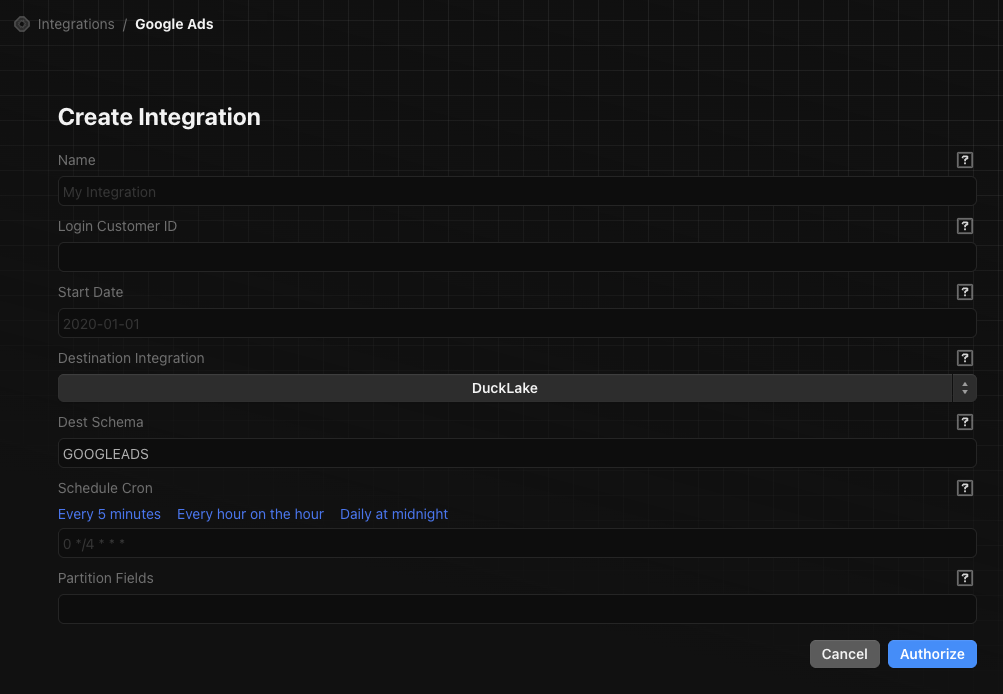
GOOGLEADS).Set a sync schedule
Enter a cron expression for how often the integration runs. Use the preset links or write your own. Examples:
- Every hour:
0 * * * * - Daily at midnight:
0 0 * * *
Partition Fields (optional)
If needed, enter a JSON object specifying partition fields per table. This only applies when the destination is DuckLake. See the target-ducklake partitioning docs for details.
Available data
Once connected, the following tables are available in your destination schema.| Table | Description |
|---|---|
campaign_performance | Daily spend, clicks, impressions, CTR, and average CPC by campaign and account |
campaign_performance_by_location | Same campaign metrics broken out by geography |
ad_groups_performance | Ad group-level performance metrics |
customer | Account metadata including descriptive names and time zones |